



Description
Strategic Card Combat in Three Kingdoms
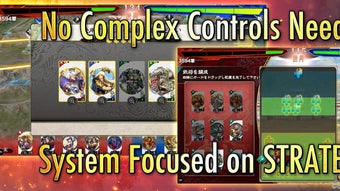
Developed by doublejump.tokyo Inc., KAI Battle of Three Kingdoms is a turn-based strategy card game that blends historical inspiration with tactical depth. The game centers on recruiting warlords from the Three Kingdoms era and constructing a strategic deck to outmaneuver opponents in battle. Players aim to conquer enemy castles by leveraging careful planning, unit positioning, and resource management. Designed for fans of deep tactical gameplay, the software appeals to strategy enthusiasts who value foresight over reflexes. The game supports both Windows and Mac platforms, making it accessible to desktop users across major operating systems. Despite its focus on strategy, the game does not require complex controls or real-time hand actions, allowing players to concentrate on long-term planning and optimal deployment. Real-world use cases include solo play against AI opponents, multiplayer duels, and competitive deck-building challenges. While the developer did not provide additional system requirements, the 500 MB installation size suggests a lightweight footprint. The game is available at no cost, though it lacks a full English mode and free in-game pulls, which may affect accessibility for international audiences.
Key Features & Capabilities
- Turn-Based Tactical Combat – Battles unfold in a structured turn sequence, allowing players to analyze the battlefield, plan moves, and execute strategies without time pressure. This format suits players who prefer thoughtful decision-making over fast-paced reactions.
- Warlord Recruitment System – Players collect and deploy warlords from the Three Kingdoms period, each with unique abilities and roles. Building a balanced and synergistic roster is essential for long-term success.
- Deck Construction & Strategy – Customization lies at the core of gameplay. Users must carefully select warlords, manage resources, and optimize card combinations to create a competitive deck tailored to their preferred playstyle.
- Castle Conquest Objective – The ultimate goal is to breach and capture the opponent’s castle. Success depends on strategic positioning, timing, and efficient use of limited in-game actions.
- Multiplayer & Solo Modes – The game supports both competitive multiplayer matches and AI-driven solo campaigns, offering flexibility for different play preferences and skill levels.
These features enable users to engage in deep, replayable experiences. For example, a player might experiment with a defensive strategy focused on castle defense or launch aggressive attacks using high-mobility warlords. The absence of real-time mechanics allows for deliberate pacing, making it ideal for players who enjoy cerebral challenges. The game’s design encourages repeated playthroughs to refine strategies and unlock new warlord combinations.
User Interface, Workflow & Performance
The user interface is structured around a central battlefield display, with card management panels and action indicators clearly laid out. Navigation is intuitive, allowing players to access their deck, view warlord stats, and initiate turns with minimal friction. The workflow follows a logical sequence: select warlords, position units, execute actions, and transition to the opponent’s turn. This streamlined process supports smooth gameplay and reduces cognitive load during decision-making. The game’s performance is expected to be stable on modern desktop systems, given its 500 MB size and turn-based nature. However, exact performance details were not specified. The developer did not provide resource usage data, so CPU and RAM behavior remain unknown. Stability during extended sessions is not confirmed, but the turn-based structure typically reduces stress on system resources. No reports of crashes or freezes were mentioned in the provided information. General software behavior patterns suggest consistent operation under normal conditions, though actual performance may vary based on hardware and background processes.
Compatibility & System Requirements
KAI Battle of Three Kingdoms is available for both Windows and Mac operating systems. The software version is 1.0.0, with an installation size of 500 MB. This suggests a modest footprint suitable for most desktop environments. Platform compatibility information is limited to these two systems, with no mention of Linux or other platforms. The developer did not specify exact system requirements, such as minimum RAM, processor speed, or graphics capabilities. As a result, users are advised to ensure their system meets general desktop software standards. The absence of detailed technical specifications means that compatibility with older or low-end hardware cannot be confirmed. Users should verify system compatibility before installation, especially if running legacy systems. No additional dependencies or external software are mentioned.
Pros and Cons
Pros
- Turn-based gameplay emphasizes strategy over reflexes
- Deep deck-building and warlord customization
- Available at no cost with no upfront purchase required
- Supports both Windows and Mac platforms
- Intuitive interface with clear navigation
Cons
- Lacks full English mode, limiting accessibility for non-Japanese speakers
- No free in-game pulls, requiring real-money spending for new warlords
- Exact system requirements not provided
- Turn-based structure may feel slow for some players
- Limited platform availability (no Linux or mobile desktop support)
FAQ Section
Is KAI Battle of Three Kingdoms available for free?
Yes, the software is available at no cost. There are no subscription fees or upfront purchase requirements.
What platforms does the game support?
KAI Battle of Three Kingdoms is compatible with Windows and Mac operating systems. No other platforms are confirmed.
Is the game safe to download and install?
As a desktop application developed by doublejump.tokyo Inc., the software is distributed through official channels. Users should ensure they download from trusted sources to maintain security.
Does the game require an internet connection?
While the provided information does not specify, multiplayer modes likely require an online connection. Solo play may be available offline, but this cannot be confirmed.
Can I play the game without spending money?
Yes, the game can be played without spending real money. However, new warlords are only obtainable through in-game purchases, as there are no free pulls available.
Final Thoughts + CTA
KAI Battle of Three Kingdoms delivers a compelling strategic experience for fans of turn-based card games. Its emphasis on thoughtful planning, deck-building, and warlord management offers a refreshing alternative to reflex-driven titles. While the lack of full English support and the absence of free pulls may limit appeal for some users, the core gameplay remains robust and replayable. The game’s lightweight design and cross-platform availability enhance accessibility. For players who value deep tactical engagement and historical-themed strategy, this software provides a rich and immersive experience. Despite its limitations, it stands out as a solid choice in the strategy card game genre. Download KAI Battle of Three Kingdoms now.
Guides & Tutorials for KAI Battle of Three Kingdoms
How to install KAI Battle of Three Kingdoms
- Click the Preview / Download button above.
- Once redirected, accept the terms and click Install.
- Wait for the KAI Battle of Three Kingdoms download to finish on your device.
How to use KAI Battle of Three Kingdoms
This software is primarily used for its core features described above. Open the app after installation to explore its capabilities.
User Reviews for KAI Battle of Three Kingdoms 0
No reviews found





